


| Latest version | 1.1.0 |
|---|---|
| Minimum Core | 13 |
| Compatible Core | 13 |
| Last updated | 1 year ago |
| Created | 1 year ago |
| Authors | |
| Languages |
English Français Polski Português Brasileiro 中文 |
| Systems | All systems |
| Project source | Project URL |
| Read-me | Readme URL |
| License | License URL |
Streamline Level Ups with the Level-Up Wizard! This module provides a level up assistant for players, allowing all relevant selections to be made in one window.
Installation
This module can be installed directly in Foundry via `Install Modules` and searching for the name. Alternatively you can install it via manifest using this link: `https://github.com/BenABaron/pf2e-level-up-wizard/releases/latest/download/module.json`
Usage
By default, a wizard hat will be rendered on the character sheet that can be clicked to start the Wizard. This icon can also be moved to the toolbar.
Alternatively, you can disable the icon, which will cause the wizard to render when a character's level changes.
The Wizard
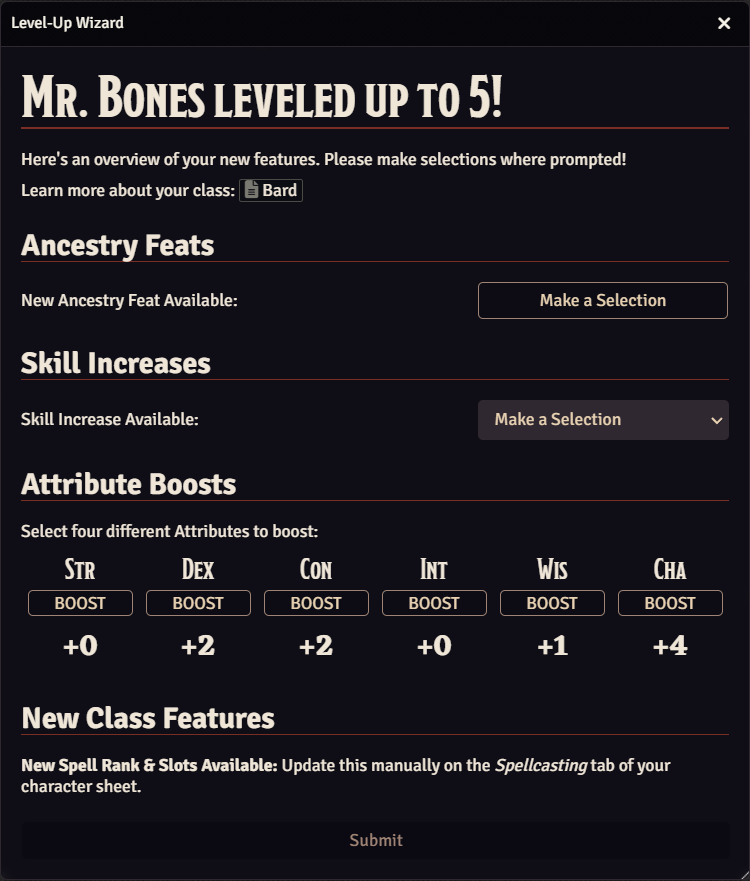
Once started, the wizard will show the player any new feature they gained with their level up, as well as prompting them to make any relevant selections if available.
Follow the steps on screen, hit submit (and confirm!), and watch as the wizard handles all of the necessary changes to the character sheet!
Feat Selection
Any time a feat selection is prompted, the wizard will only show you feats that correspond to the character's information.
These feats can be filtered and sorted, allowing for an easier time finding the feat that you're looking for!
Chat Messages
Upon level up completion, the wizard will send a confirmation message in chat to all players detailing selected feats and skill increases selected by the player.
In addition, if the player character is a spellcaster, they will receive a whisper reminding them to update their spell slots. Similarly, if Int is boosted through an Attribute Boost, they will receive a whisper to select a new langauge and skill increase.
Variant Rules
PF2e Level-Up Wizard supports all variant rules, but does not have it's own settings to toggle them on or off - it instead accesses settings from the core system and PF2e Workbench to determine if it should render options for Variant Rules. In addition, if Automatic Bonus Progression is enabled, the wizard will include selections for Skill Potency boosts at the associated levels.
Settings
- Enable Level Up Button (GM Only): When enabled, display a Level-Up button on character sheets. When disabled, the Level-Up Wizard will activate automatically after manually updating a character's level.
- Level-Up Button Placement: Select where the Level-Up button appears: either next to the character's level or in the toolbar at the top of the character sheet.
- Feat Sorting Method: Choose how feats should be sorted by default.
- Display Feat Prerequisites (GM Only): When enabled, display an asterisk (*) next to Feats with prerequisites in Feat Selection windows.
- Skill Increase Info: Select how much info to show in Skill Increase selections. Can be changed to include the skill's modifier and/or the next proficiency rank.
- Disable Level Input (GM Only): When enabled, the default level input on the character sheet will be disabled to encourage the use of the Level-Up Wizard for leveling up. This setting has no effect if the 'Enable Level-Up Button' setting is disabled.
- Send Manual Update Whispers to GM (GM Only): When enabled, whispers about required manual updates (such as spell updates) will also be sent to the GM in addition to the player.
- Hide Rare and Uncommon Feats (GM Only): When enabled, Uncommon and Rare Feats will be hidden in Feat Selection window.
- Enforce XP Requirements (GM Only): When enabled, the Level-Up button will only appear if the character has enough XP to level up. After leveling up, the required XP will be deducted from the character's total, and any remaining XP will be carried over.
- Additional Feat Sources (GM Only): Specify a comma-separated list of compendium keys containing feats you would like included in the wizard. Example: 'pf2e-playtest-data.impossible-playtest-class-feats, my-custom-compendium.feats'. Ensure the compendiums are enabled and accessible.
Future
You can find the project board of planned features at the PF2e Level-Up Wizard Workshop
Bug Reporting, Issues, & Feature Requests
Note: Before submitting an Feature Request, please check the project board to see if the feature is already planned.
Feel free to reach out to me on Discord at Zumanzo#8754, and/or open an issue on Github.

